There's no shortage of edtech tools out there. Every week there's a new app promising to revolutionise your classroom. Most of them I try once and forget about. But some stick.
These are the digital tools I actually use, not the ones I've bookmarked to "try later," but the ones that have earned a permanent spot in how I run my classroom.
Google Classroom
I'll start with the obvious one. Google Classroom is the backbone of how I manage assignments, resources, and communication with students. It's not flashy, but it works. Students know where to find things, I know where to post things, and it integrates with everything else in the Google ecosystem.
Is it perfect? No. But it's reliable, students already know how to use it, and it doesn't try to do too much. Sometimes boring and functional is exactly what you need.
Typing Club
Typing is one of those skills that's easy to neglect because it doesn't fit neatly into a curriculum area. But students who can type fluently get more done. Simple as that.
I use Typing Club for regular typing practice. It's structured, tracks progress, and students can work through it independently. I usually schedule typing sessions a few times a week, and it's one of those set-and-forget tools that just runs in the background while building a genuinely useful skill.
Prodigy
For maths practice, Prodigy has been solid. It's game-based, which keeps students engaged, but the maths content underneath is curriculum-aligned and adaptive. Students think they're playing a game. They're actually doing maths problems.
I don't use it as my core maths instruction. It's a supplement. But for independent practice or fast finishers, it works well. The teacher dashboard gives you a decent view of what students are working on and where they're struggling.
Class Dojo
Class Dojo has been around for years, and I still use it. Mainly for the behaviour points and parent communication. It's simple to give feedback in the moment, and parents can see how their child's day went.
It's not perfect. The interface is busier than I'd like, and I don't use half the features. But for quick positive reinforcement and keeping parents in the loop, it does the job.
Canva
I use Canva for pretty much any visual I need to create: worksheets, posters, slides, certificates, whatever. The templates save a heap of time, and the education version is free for teachers.
It's one of those tools that doesn't feel like "edtech" but makes my life noticeably easier. Any time I need something to look half-decent without spending an hour on it, Canva's where I go.
ChatGPT and Gemini
I use AI tools daily now. Mostly ChatGPT and Gemini. Not for teaching directly, but for my own planning and admin.
Drafting parent emails, brainstorming lesson ideas, creating differentiated activities, generating word lists, explaining concepts in different ways. AI handles the first draft, I refine it. It's cut hours off my weekly workload.
I've got more thoughts on AI in education (that's a whole other post), but for now: if you're not using it for your own planning and admin, you're working harder than you need to.
The Tools I Built Myself
This is where I get to mention my own apps, not because I'm trying to sell you on them, but because I genuinely use them every day with my class. That's why I built them.
Spell Star handles my weekly spelling tests. I set up each student's list, they practise during the week, and they take their test when I schedule it. No reading words aloud twenty times, no marking stacks of paper, no data entry afterwards.
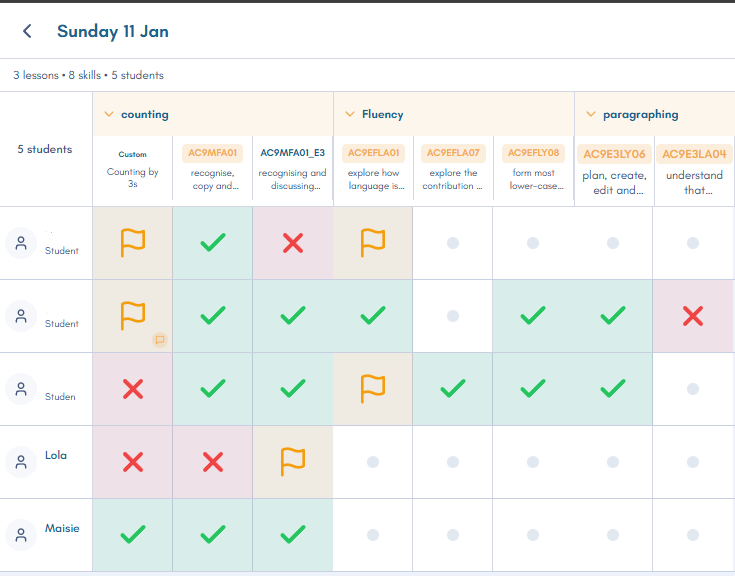
Formative Check is how I track skills while I'm teaching. I roam around with my iPad and check off what I observe, and the content descriptors from the Australian Curriculum are already loaded in. It captures formative assessment without creating extra paperwork.
Classroom Pro is my classroom dashboard. It started because I was sick of generic timer apps and wheel spinners that didn't remember anything about my class. I wanted my class data to persist: rosters, groups, points, everything in one place that actually knows who my students are.
These three are what I reach for constantly. They're not trying to replace everything else. They just fill the gaps where other tools weren't cutting it for me.
What Didn't Stick
For balance: I've tried plenty of tools that didn't last.
Generic timer and spinner apps were the big one. I used heaps of them: random name pickers, countdown timers, classroom noise monitors. They worked fine in isolation, but none of them remembered my class. Every session was starting fresh. That friction added up, which is partly why I built Classroom Pro.
I've also tried various quiz apps, flashcard tools, and gamified learning platforms that just didn't fit how I teach. Not because they're bad. They just weren't right for me. The tools that stick are the ones that match how you actually work, not the ones with the most features.
The Common Thread
Looking at this list, the tools that last for me share a few things:
They're simple to use. If it takes more than a few seconds to do the thing I need to do, I'll stop using it.
They don't try to do everything. Focused tools beat bloated platforms.
They save me time. Either in the moment or downstream. If a tool creates more work than it saves, it's gone.
Your list will probably look different: different year level, different teaching style, different school setup. But if you're drowning in edtech options and wondering what's actually worth your time, these are the ones that have earned their spot for me.
If you're interested in specific classroom problems these tools solve, I've written about formative assessment without the paperwork and the problem with traditional spelling tests.
Share your thoughts on this post
No comments yet. Be the first to share your thoughts!